Best MCP Servers for B2B Data & Prospecting (2026)
Most MCP servers are lazy wrappers. How to judge the best MCP servers for B2B data with a real Claude session, native-tool criteria, and honest costs.
Every week someone asks the MCP community the same question: out of thousands of servers in the registries, which three to five would you actually recommend for a working AI workflow? And every week the same complaint follows: most of the catalog is paid APIs wrapped with minimal effort.
The best MCP servers for B2B data do not survive that filter on features. They survive it on a working session.
So this guide starts with one: a real conversation in Claude, from a cold brief to enriched contacts. Then it pulls the criteria out of what you just watched, and ends with an honest shortlist.
Key Takeaways#
- Judge a B2B data MCP server by a working session in your own chat, not by a feature table.
- The community's core complaint is real: many servers are one lazy "search" tool dumping raw JSON.
- A native server exposes separate, typed tools an agent can chain: search, resolve, enrich, posts.
- Metering matters: you want per-call cost visible before an agent runs a thousand calls.
What Is a B2B Data MCP Server?#
A B2B data MCP server is a server that exposes company and professional data as native tools an AI assistant can call directly, over the Model Context Protocol. Instead of your code calling a REST API, the model itself searches people, looks up companies, and enriches contacts mid-conversation.
MCP is the open standard that connects assistants like Claude to outside tools and data. For B2B data, that turns a chat or an agent into something that can answer "find me the right 30 people and their emails" with live records instead of guesses.
What Does a Real Session Look Like Inside Claude?#
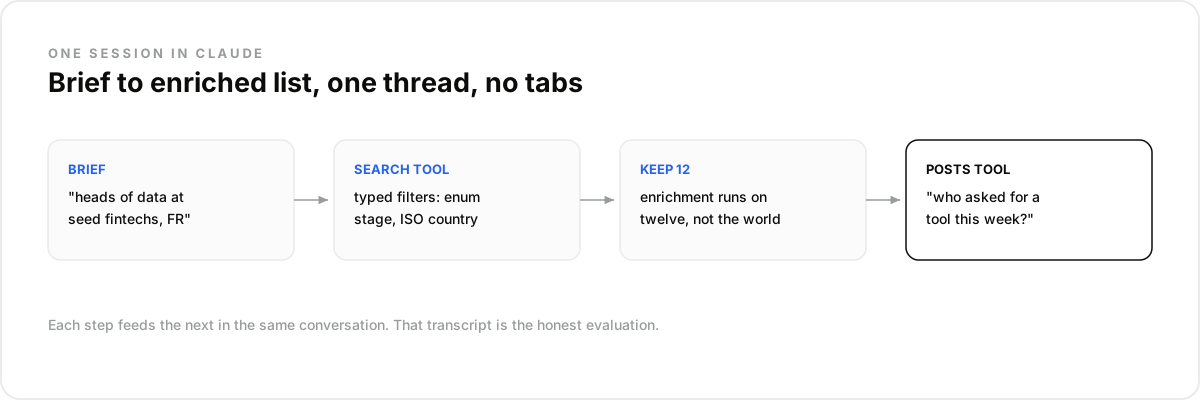
The honest test of any server is one conversation that goes from brief to actionable list. Here is a real session shape, run against a connected B2B data server, that exercises search, enrichment, and intent in a single thread with no tabs and no CSV exports in between.
Setup is one connector. In Claude, Settings, then Connectors, then add the server URL. On older desktop builds, the config file does the same job:
{
  "mcpServers": {
    "dataforb2b": {
      "command": "npx",
      "args": ["-y", "mcp-remote", "https://mcp.dataforb2b.ai/mcp"]
    }
  }
}
Reproducing it takes two minutes: a free account at app.dataforb2b.ai/signup and the connector added. Pin the finished conversation as a scheduled routine and the sweep reruns weekly on its own. The same connector works in Cursor, VS Code, or any MCP-enabled agent.
Then the session. First: "Find heads of data at seed and Series A fintechs in France." The agent calls the people-search tool with typed filters, funding stage as an enum, country as an ISO code, and returns a scannable list.
If funding rounds are the signal you care most about, the Crunchbase API review looks at when a dedicated funding database still earns a place next to an MCP layer.
Second: "Keep the twelve best fits and get me verified work emails." The enrichment tool runs on exactly twelve profiles, not on the whole result set.
Third: "Who asked for a data provider on Reddit this week?" The posts tool searches by keyword and platform, and each author is a warm lead with a timestamp. We run the research for this very blog through the same tools, which is as honest as dogfooding gets.
What a B2B Data MCP Server Is NOT#
Three things wear the label and disappoint in production. A wrapped API with one giant tool, a GTM app's integration endpoint, and a stale community experiment. Naming them saves you the two weeks it takes to find out inside your own workflow, which is where it always shows.
Not a lazy wrapper. One "search" tool that takes a string and dumps raw JSON is a REST API in a costume. The model cannot reason over it, chain it, or recover from a bad query.
Not a GTM app connector. Apollo or ZoomInfo integrations exist to drive their own application. Useful if you live in that app; not a data layer your agent controls.
Not a registry curiosity. The awesome-lists are full of unmaintained experiments. A server your pipeline depends on needs an owner, uptime, and versioned docs.
How Do You Spot a Native Server vs a Wrapper?#
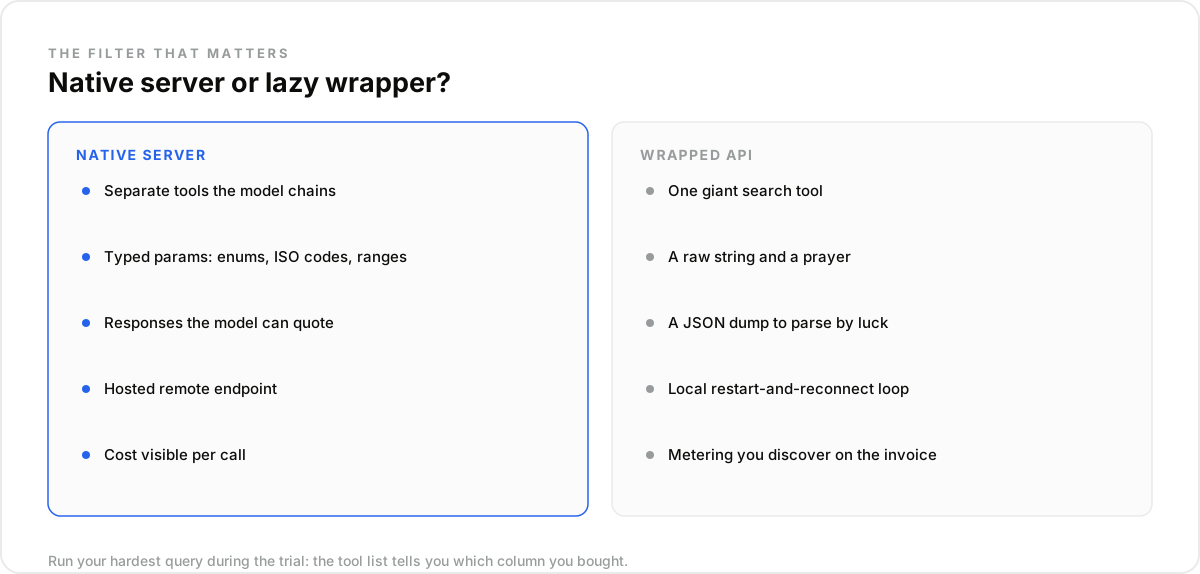
A native server is designed for the model, not just reachable by it. The tell is in the tool list: separate, typed tools the agent can chain, with descriptions that teach the model when to use each one. A wrapper has one entry point and a prayer.
The checklist worth running on any candidate:
- Separate tools for search, value resolution, enrichment, and posts, so the agent composes them.
- Typed parameters: enums for funding stages, ISO codes for countries, ranges for company size.
- Responses the model can quote and chain, not a raw dump it has to parse by luck.
- A hosted remote endpoint. Builders describe local-server testing as a restart-and-reconnect loop; a remote URL removes the whole cycle.
- Docs written for agents, like an llms.txt index the model can actually read.
Run your own hardest query during the trial. A server that handles "RevOps leaders at 50 to 200-person SaaS companies that raised this year" as typed filters is native. One that needs you to pre-build the list is not.
What Should a B2B MCP Server Cost to Run?#
Whatever the pricing model, the requirement is the same: cost per tool call must be visible before an agent loops. The cautionary tale made the rounds recently when a major CRM began metering its hosted MCP servers per action, while customers reported no way to monitor the consumption they were already depending on.
That is the failure mode to screen for. An agent is a loop that can call a tool a thousand times, so opaque metering is not an inconvenience, it is an unbounded liability sitting in your workflow.
What to demand: a credit price attached to each call type, usage you can query, and a free tier deep enough to run a real evaluation session before any contract. If a vendor cannot say what one enrichment costs, the answer is a different vendor.
Which Servers Belong on a 2026 Shortlist?#
Shortlist by category, because the categories fail differently. Agent-native data layers give your agent direct control of search and enrichment. GTM platforms with MCP endpoints suit teams already living in those apps. Community servers fill gaps, if someone maintains them. Most stacks end up with one of each.
Agent-native data layers. Built API-first, MCP as a first-class surface. DataForB2B is the one we can speak for: people search across 800M+ profiles, company search, enrichment with verified work emails, and social-post search, exposed as separate typed tools on one sales MCP server. The session above is what it looks like connected.
GTM platforms adding MCP. Apollo and ZoomInfo are finished applications with real data behind them, and their MCP surfaces are built to serve their own workflows. Strong choice if their app is already your system of record; check their current docs, this corner moves fast.
Registries for the long tail. The public MCP registries and curated lists are where you find niche coverage. Apply the wrapper checklist above twice as hard there.
The Mistake Most Teams Make Picking One#
The mistake most teams make is choosing on coverage numbers and skipping the session. Every provider claims hundreds of millions of profiles. None of those numbers tells you whether the server answers your ICP query, in your chat, with tools your agent can chain on a Tuesday.
In our experience, thirty minutes of real conversation exposes more than any comparison page: whether filters are typed, whether enrichment runs on a shortlist or the world, whether costs surface per call. What surprised us is how many evaluations still never include a single live session.
Connect a server and run your hardest brief against it today. The free tier on the pricing page covers a full evaluation session.
The recurring questions from builders comparing servers, after the demo glow wears off and before anything gets wired into production: what these servers are, how to spot the wrappers, what usage costs, and which assistants can actually connect to one this year.
The feature table will not run your workflow; a session will. Connect the DataForB2B server, run your hardest brief, and judge from the transcript. Start on the pricing page.
Frequently asked questions
- What is an MCP server for B2B data?
- It is a server exposing professional and company data as native tools over the Model Context Protocol. Connected to an assistant like Claude, it lets the model search people and companies, enrich contacts, and read intent signals directly in conversation, with live records instead of training-data guesses.
- How do you tell a native MCP server from a wrapped API?
- Look at the tool list. Native servers ship separate, typed tools the model can chain, search, resolve, enrich, with parameters like enums and ISO codes. A wrapper ships one generic tool that dumps raw JSON. If the model cannot compose the tools, it is a wrapper.
- What does a B2B data MCP server cost to use?
- Typically usage-based: credits per search result or per enrichment, on top of a free tier for evaluation. The number matters less than the visibility. Demand a stated cost per call type and queryable usage, because an agent loop multiplies whatever the real price is.
- Can ChatGPT use MCP servers, or only Claude?
- MCP is an open standard, not a Claude feature. Claude, Claude Code, Cursor, and VS Code support it out of the box, and other clients are adding support on their own schedules; check your client's current docs. Where MCP is unavailable, the same data stays one REST call away.
- What data should a B2B MCP server expose?
- At minimum: people search with deep typed filters, company search with firmographics and funding, enrichment that returns a verified work email, and ideally social-post search for intent. Each as its own tool, so the agent chains find, verify, and reach in one thread.