How to Connect Claude to GitHub Candidate Data (2026)
How to connect Claude to GitHub candidate data: enrich a technical shortlist with real code activity, a recruiting signal that has no real use in sales.
A resume says "expert in distributed systems." A GitHub profile either backs that up with years of commits, or it does not. One of those is a claim. The other is evidence.
Most sourcing tools stop at the resume and the LinkedIn profile. For a technical role, that is half the picture. The other half lives in a candidate's actual code, and almost nobody checks it before the first interview.
This guide covers connecting Claude to GitHub candidate data specifically: what it can tell you, what it cannot, and where it fits in a recruiting workflow, not a sales one.
Key Takeaways#
- GitHub enrichment is a recruiting and technical-sourcing signal, not a sales one. It has no useful role in outbound.
- Claude pulls GitHub activity as part of profile enrichment, not as a separate search, so it pairs naturally with a skills-based candidate search.
- Code activity confirms a skill claim; it does not replace an interview. Treat it as a stronger filter, not a hiring decision.
What Does It Mean to Connect Claude to GitHub Candidate Data?#
Connecting Claude to GitHub candidate data means giving it a tool call that enriches a resolved profile with GitHub activity, so a sourcing agent can rank candidates by real code signal instead of self-reported skills alone.
This is not a GitHub-only search. It is one enrichment field among several, returned alongside a work email when requested, from the same profile lookup.
The distinction matters for setup: you do not query GitHub directly. You resolve a candidate first, through skills or title, then enrich that specific profile.
That two-step shape is worth internalizing before writing any prompt. Search finds who might fit. Enrichment answers a narrower question about someone who already made the cut: does their public activity back up the claim on their profile.
Is This Only Useful for Engineering Roles?#
Yes, largely. GitHub activity is a strong signal for engineering and other code-adjacent technical roles, and close to meaningless for most other functions, which is why it belongs in a sourcing workflow and nowhere near a sales one.
Even within engineering, raw activity alone is a weaker signal than it looks. A builder working on this exact problem raised it in public recently: two candidates can each show 500 commits and still tell you almost nothing about what they are actually good at. One might be 500 commits of AI infrastructure work. The other, 500 commits of dev tooling. On the surface, the profiles look identical, and commit count alone cannot tell them apart.
The mistake most teams make is treating enrichment as one-size-fits-all, and a close second is treating commit count as the whole signal. A verified work email matters for every outreach. GitHub activity matters only when the role involves writing code, and even then it needs to be read for what was built, not just how often.
This is worth restating plainly because it is easy to get backwards while building the workflow: enrich_github is a recruiting and technical-sourcing field. It has no place in a sales enrichment call. A sales agent enriching for outreach wants a verified work email, not a code history nobody on that team will ever look at.
How Do You Search for Candidates Before Enriching Them?#
curl -X POST https://api.dataforb2b.ai/search/people \
  -H "api_key: YOUR_api_key" \
  -H "Content-Type: application/json" \
  -d '{
        "filters": {
          "op": "and",
          "conditions": [
            { "column": "skill", "type": "in", "value": ["Rust", "Distributed Systems"] },
            { "column": "years_of_experience", "type": ">=", "value": "4" }
          ]
        }
      }'
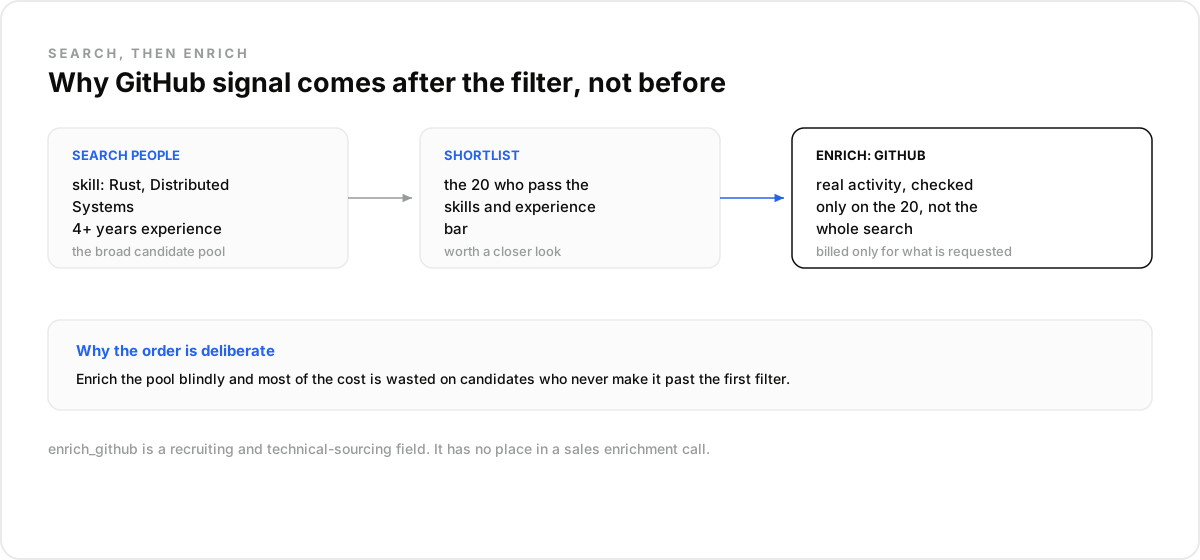
That builds the candidate pool: real skill tags, a minimum experience bar. GitHub enrichment comes after, applied to the specific profiles worth a closer look, not to every result in a broad search.
How Does Claude Combine GitHub Signal With a Resolved Profile?#
Claude requests GitHub enrichment as a flag on a profile lookup, alongside a work email if needed, so both come back from a single resolved identity instead of two separate searches that have to be manually matched up.
The profile identifier can be a LinkedIn URL, a public ID, or in some cases a handle. Once resolved, enrichment is billed only for what is actually requested, so a search that pulls fifty candidates does not automatically enrich all fifty for GitHub if only ten make the shortlist.
That ordering is deliberate. Enrich the pool blindly and most of the cost is wasted on candidates who never make it past the first filter. Enrich the shortlist, and every enrichment call is one that was already worth making.
One sourcing agent builder described the shift in cost this way: their first version enriched every result from every search, GitHub included, and burned through credits on candidates who were never a serious match. Moving enrichment to after the skills filter cut that waste without losing any real candidates from the shortlist.
What Does This Replace, and What Does It Not?#
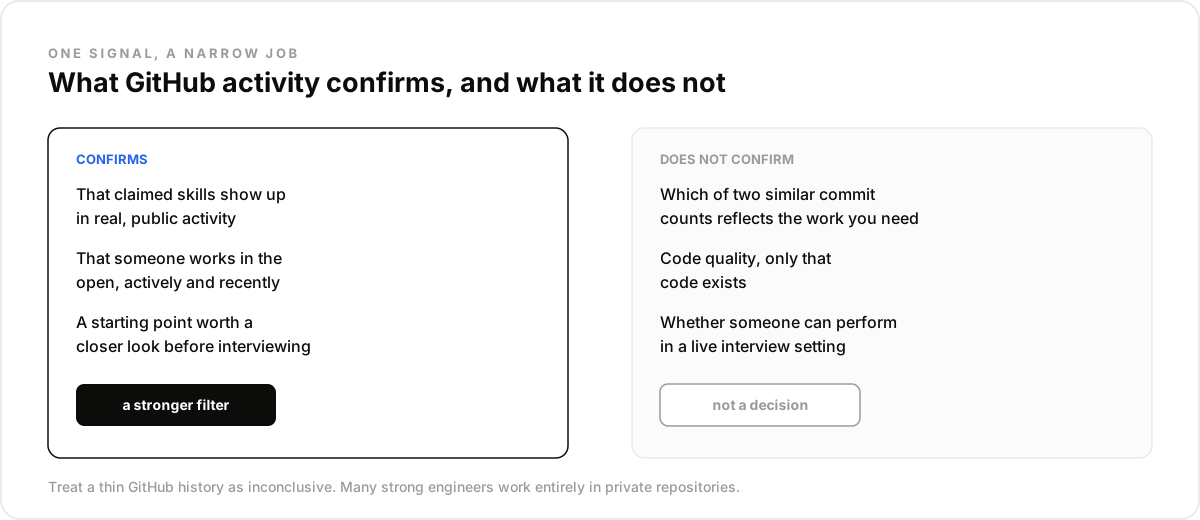
This does not replace a technical interview, and it does not replace checking a candidate's actual repositories by hand when a decision gets close.
Not a technical interview. Commit history shows activity, not necessarily quality. A candidate can commit constantly to a personal project and still struggle with a live coding exercise, or the reverse.
Not a substitute for reading the code. Enrichment surfaces that GitHub activity exists and gives a starting point. For a final-round candidate, a human still opens the actual repository.
Not a general people-search replacement. This is one enrichment field layered onto an existing candidate search, not a standalone way to discover people who have never shown up in a skills-based query at all.
Put together, those three boundaries define the job this data actually does: confirm activity on candidates already found another way, as one more data point among several, never the whole picture on its own.
How Do You Rank a Shortlist Once It's Enriched?#
You rank it by treating GitHub activity as a tiebreaker, not the primary filter; skills and experience narrow the pool first, and code signal decides who gets contacted before the others.
A practical pattern: pull twenty candidates on skill and experience, enrich all twenty for GitHub, and prioritize outreach toward whichever five show consistent, relevant activity. The other fifteen are not disqualified, just later in the queue.
This fits a technical-sourcing agent that already has a strong skills filter and wants a second signal to break ties. It does not fit a broad top-of-funnel search where nobody has been narrowed down yet; enriching everyone at that stage burns credits on candidates who will never reach a shortlist.
The trade-off worth naming directly: GitHub activity rewards people who work in the open. A strong engineer who only commits to private company repositories will look identical to an inactive one in this data. Treat a thin GitHub history as inconclusive, not as a red flag on its own.
How Do You Run This Workflow in Claude?#
You run it as a search-then-enrich pair scoped to a specific technical role, so GitHub signal only ever gets pulled for candidates it is actually relevant to.
- Create a free DataForB2B account at app.dataforb2b.ai/signup and grab your API key.
- In Claude, open Settings, then Connectors, and add the MCP server. The same connector works in Cursor, VS Code, ChatGPT, or any MCP-compatible agent.
- Paste a working prompt: "Find backend engineers with 4+ years of experience and Rust or Go skills, then enrich each for GitHub activity and rank by relevance."
- Turn it into a scheduled routine tied to an open req, so the shortlist refreshes as new candidates match instead of running the search once and going stale.
Read more on what a real candidate sourcing run looks like, or start on the free tier from the pricing page. The same routine adapts to any technical role by swapping the skill filter, without touching the rest of the setup.
Frequently asked questions
- Can Claude look at a candidate's actual GitHub activity?
- Yes, as part of profile enrichment. Once a candidate is resolved through a search or a known profile, GitHub activity can be requested alongside other enrichment fields like a work email.
- Is this only useful for engineering roles?
- Almost entirely, yes. GitHub signal is strong for code-adjacent technical roles and not meaningful for most other functions. It should not be part of a general sales or non-technical sourcing workflow.
- How does this differ from checking GitHub manually?
- Manual checking means opening each candidate's profile one at a time. This resolves and enriches at the same scale as the rest of a sourcing search, so GitHub signal becomes one filterable field instead of a separate research step.
- Can Claude combine GitHub signal with a LinkedIn profile?
- Yes. Enrichment is keyed on a resolved profile identity, so GitHub activity and other fields like a work email come back from the same lookup rather than requiring two disconnected searches, no matter which identifier the search started from.
- Does this replace a technical interview?
- No. It is a stronger pre-interview filter than a resume alone, confirming that claimed skills show up in real activity. The final assessment of whether someone can do the job still belongs to the interview. A candidate with thin public activity is not automatically weaker, just harder to confirm this way, since plenty of strong engineers work entirely in private company repositories.