How to Build an AI Recruiting Agent (2026 Field Guide)
How to build an AI recruiting agent that survives real reqs: the candidate data layer, filters, enrichment, and the traps that kill agents after the demo.
A recruiting lead recently tallied the AI sourcing demos they had sat through in a year: seven. Every one looked brilliant while the sales rep was driving. Every one cracked within two weeks of running against real reqs.
The cracks were not model problems: candidates three years out of the industry surfaced because an old title matched, and outreach opened with "I came across your profile."
This is a guide to how to build an AI recruiting agent that survives a real req load: the data layer underneath it, the query, the enrichment step, and the parts a recruiter should never hand over.
Key Takeaways#
- A sourcing agent is only as good as the database underneath it. Better prompts cannot repair weak coverage.
- The demo-to-production gap is a data problem: taxonomy, recency, and title-versus-reality.
- Filter hard first, enrich only the shortlist, and keep every ranking explainable.
- The agent proposes. A recruiter reviews who was surfaced and who was skipped.
Why Do Sourcing Agents Die After the Demo?#
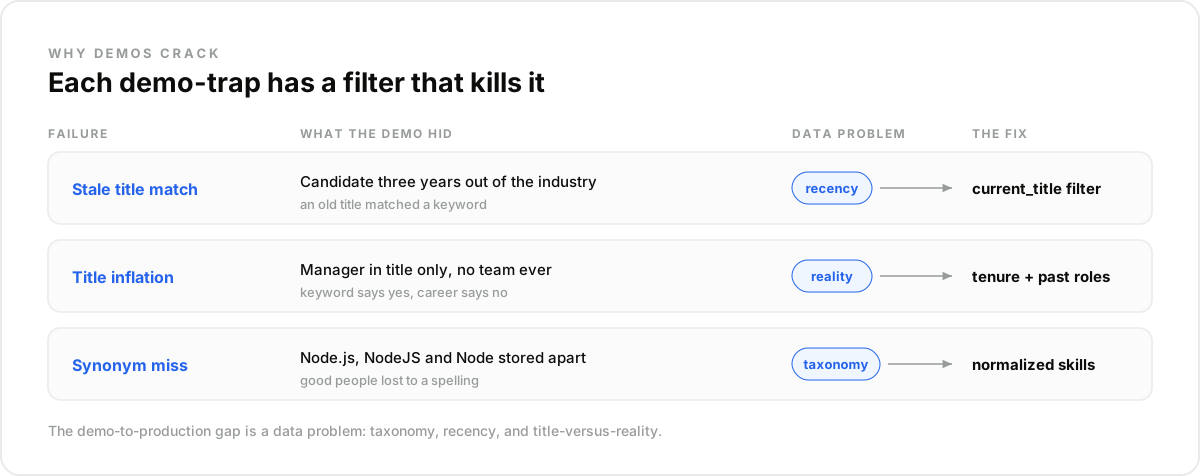
Sourcing agents die after the demo because demos run on curated examples and reqs run on the real database. Recruiters who have tested these tools report the same failure modes, and nearly all of them trace back to the data layer rather than to the model.
The specifics repeat across teams: an "engineering manager" in title only, ranked above someone who actually managed engineers, and shortlists indistinguishable from the job board.
One practitioner who works across talent databases put it simply: the AI can only work with the database underneath it. Weak coverage or inconsistent labels, and a better prompt fixes nothing.
What Is an AI Recruiting Agent?#
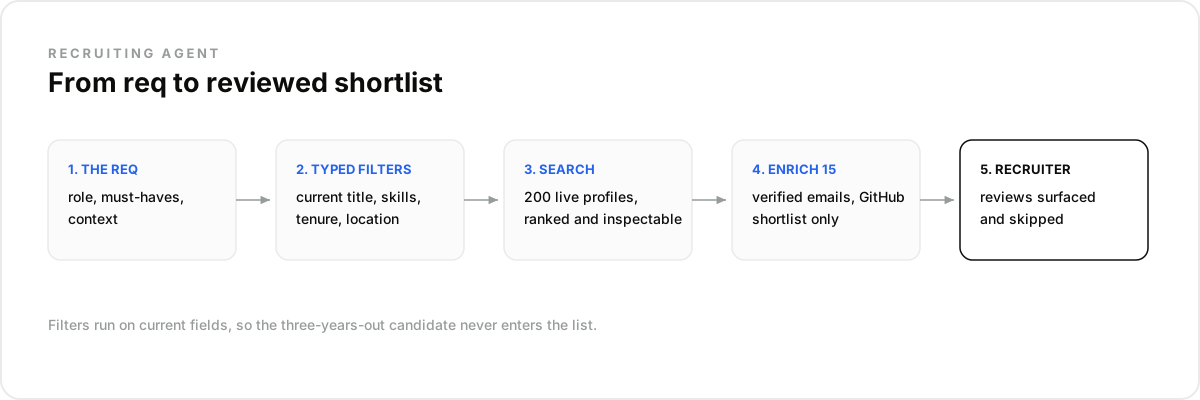
An AI recruiting agent is software that turns a role into a structured candidate search, runs it against a profile database, enriches the matches, and returns a ranked shortlist. It automates the sourcing pass: the hours between a req opening and a recruiter having people worth calling.
It is a sourcing tool, not a hiring manager: the agent finds and organizes, while a recruiter judges fit and owns the decision.
What an AI Recruiting Agent Is NOT#
The category is easiest to see from its borders, because three neighboring tools get confused with it constantly. A recruiting agent is not your ATS, not a recruiter seat with a chat window bolted on, and not an automated rejection filter.
Not an ATS. Greenhouse and Lever manage candidates who already entered your process. A sourcing agent works the other side of the wall: people who never applied.
Not a recruiter seat with AI sprinkled on. A seat-based sourcing tool is a human workflow with a search box. An agent needs the candidate pool as an API it can query, re-query, and act on programmatically.
Not an auto-rejector. The agent proposes people into a pipeline. It should never silently filter humans out of one, which is where automation becomes a compliance problem.
How Do You Pick the Candidate Data Layer?#
Pick the data layer by testing it against your hardest real reqs, because no two candidate databases are built the same. Each has its own taxonomies, labels, and matching logic, and the exact same search returns different people depending on which pool it runs against.
The differences are concrete. One provider treats Node.js, NodeJS, and Node as a single skill; another stores them separately and loses candidates to a spelling. Providers like Coresignal or People Data Labs each carry a different shape of coverage, which is why your test req beats any sales deck.
Whatever provider you evaluate, the criteria worth scoring are the same:
- Skill and title normalization, so a query is not defeated by a synonym.
- Recency: does the record reflect the current role, and can you filter on it?
- Filter depth across every family: profile, current job, past jobs, skills, education, languages, certifications, and experience.
- Enrichment in the same stack, so a shortlist becomes contactable without a second vendor.
- REST and MCP access, so the agent queries natively.
How Does the Agent Turn a Role Into a Query?#
The agent turns a role into a query by expressing the req as filters instead of keywords: current title, skills, location, tenure. Filters are what separate a shortlist from a keyword dump, because each one closes a failure mode the demo never showed you.
Take a senior backend engineer in London who ships Go, against a people search API:
import requests

response = requests.post(
    "https://api.dataforb2b.ai/search/people",
    headers={"api_key": "YOUR_api_key", "Content-Type": "application/json"},
    json={
        "filters": {
            "op": "and",
            "conditions": [
                {"column": "current_title", "type": "like", "value": "Backend Engineer"},
                {"column": "skill", "type": "in", "value": ["Go", "Golang"]},
                {"column": "current_job_location", "type": "like", "value": "London"},
                {"column": "years_of_experience", "type": ">=", "value": 6},
                {"column": "is_currently_employed", "type": "=", "value": True}
            ]
        },
        "count": 50
    }
)

shortlist = response.json()["results"]
Notice what the filters encode. Querying current_title rather than any title ever held is what keeps the three-years-out candidate off the list. The skill filter catches both spellings; the tenure floor screens seniority the title cannot prove.
The query runs live on the free tier, via the pricing page.
How Do You Enrich Without Wasting the Pool?#
Enrich the shortlist, never the raw search result. A query might return two hundred candidates and a recruiter will contact fifteen. Enriching the fifteen keeps spend proportional to outreach, and running it at contact time means the record is current at the moment it matters.
For technical roles, enrichment means two things: a professional email that makes the candidate reachable, and GitHub activity that grounds the ranking in shipped work instead of self-reported skills. A data layer like DataForB2B pairs search and enrichment in one stack, so a shortlist becomes contactable without a second vendor.
In one real build, a three-person sourcing-tool team keeps a nightly watch on roughly four hundred shortlisted engineers. When one changes roles or shows movement, the agent re-pulls the live record, rechecks tenure, and only then enriches for email and GitHub. Enrichment runs on a dozen profiles a night, not four hundred.
Why Watch the Shortlist After You Build It?#
Because a shortlist is a snapshot of a moving market. The strongest candidates were not looking when you found them, and the moment that changes is exactly when outreach lands. An agent that watches its own shortlist catches that moment; one that only searches keeps missing it.
The mechanics are light: a monitor on the shortlisted profiles fires an event when someone changes roles. The agent re-pulls the live record, rechecks fit, and only then pings the recruiter with a reason to reach out today. Very few teams get told, the week it happens, that an engineer shortlisted in March just became movable.
Should the Agent Rank Candidates at All?#
Yes, but as a reading order, not a verdict. Ranking on concrete signals a recruiter can inspect, like tenure, skills, and relevant past companies, makes a shortlist scannable. A single opaque fit score invites either blind trust or blanket distrust, and both waste the work.
The trade-off: building on a data API means owning the ranking logic and its audit trail instead of renting a black box. You trade plug-and-play for explainability; in hiring, explainability wins.
You might worry that an API-first build takes months. It does not: the search is one POST request, and over MCP the agent calls the pool as a native tool with no integration code.
Fairness is a build requirement. Rank on job-relevant signals only, keep the full list one click away, and have a recruiter review who was surfaced and who was skipped.
The Mistake Most Teams Make#
The mistake most teams make is optimizing for volume, measuring the agent by how many candidates it surfaces. Five hundred names is not sourcing; it is the sorting problem moved onto the recruiter's desk. Precision is the product.
The same volume instinct ruins outreach. Recruiters describe the flood of templated messages these tools generate, all ignored. Personalization is not adjectives; it is data fields: a real tenure, a real repo, a real reason the role fits.
What surprised us is how often the fix was not a better model but two more filters and a fresher record. In our experience, the data layer decides whether the agent survives the Tuesday afternoon when a recruiter actually needs it.
Run the Loop in Claude, or Any LLM Agent#
Everything above runs as a conversation before it runs as code. Connect the candidate pool to Claude over MCP and the query, the enrichment discipline, and the shortlist watch become instructions you type, with the same typed filters working underneath.
- Create a free account at app.dataforb2b.ai/signup and grab your API key.
- In Claude, open Settings, then Connectors, and add https://mcp.dataforb2b.ai/mcp. The same server plugs into Cursor, VS Code, ChatGPT, or any MCP-enabled agent.
- Paste the brief: "Here is the job description. Source 25 matching candidates, current roles only, and get verified work emails for the top 10."
- Turn the working chat into a scheduled routine so it runs for every open req without you.
Frequently asked questions
- Why does my sourcing agent return the same people as LinkedIn?
- Because it is probably searching a similar pool with shallow defaults. Differentiation comes from filter depth and recency: querying tenure, certifications, languages, or past-company history surfaces people a keyword search never ranks, and live records catch moves a static index misses.
- Which filters matter most for technical roles?
- Current title, normalized skills, tenure, and location carry most reqs. The underrated ones are years_in_current_position, which hints at who might be open to a move, past_company for pedigree, and certifications for regulated roles. Filter depth is what makes hard reqs expressible.
- Can an agent source passive candidates?
- Yes, and that is most of its value. Passive candidates never apply, so they only appear through search over a broad profile pool. The agent can also watch a shortlist for role changes, catching the moment someone becomes movable without anyone refreshing a page.
- How do I stop the agent from surfacing outdated profiles?
- Fetch live at decision time. Rank and browse on cached data if you like, but re-pull the record before outreach, and filter on current employment fields rather than any title ever held. Most embarrassing sourcing errors are stale-record errors wearing a matching keyword.
- Do I need to build my own candidate database first?
- No, and you probably should not. Licensing raw data and keeping it fresh is a whole company in itself. Querying a data layer over REST or MCP gives the agent 800M+ profiles with search and enrichment attached, while your team builds the product on top.